Aurora alerts for iPhone

Know when to go.

Southward watches the whole chain, from the Sun to your own sky, and tells you when it's worth heading out.

Coming soon to the App Store

Free to download. Pro adds Go now alerts and Live Activities.

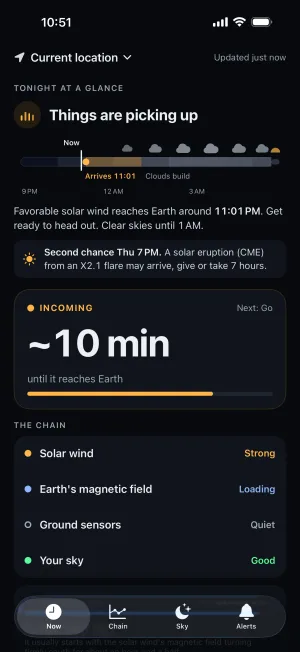
Now screen showing aurora energy arriving in about ten minutes

Why Southward

Kp tells you what already happened.

Most aurora apps wait for one number to cross a line. Southward watches what leads up to the show, so you hear about it while there's still time to get somewhere dark.

A single Kp alert

  • A three-hour index that often climbs after the show has started
  • The same threshold for Fairbanks and for Rhode Island
  • Says nothing about your clouds, the moon or how dark it is
  • Gives you a number, not what to do

Southward

  • Reads the solar wind 30 to 60 minutes before it reaches Earth
  • Tuned to your place, and to how big a show you'd get up for
  • Checks clouds, moonlight and dark hours where you are
  • Every alert says what to do next: check the sky, get ready, or look north

How it works

Four links, one answer.

An aurora is the end of a chain. Southward follows every link and only calls it when they line up.

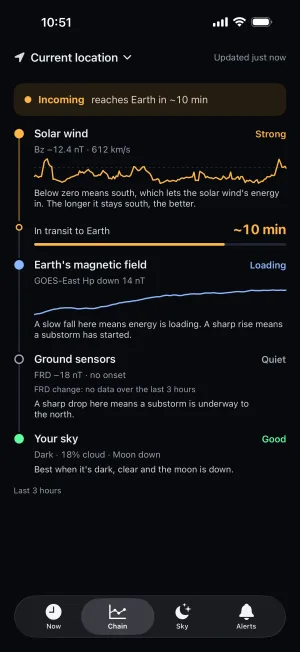
The chain from solar wind to your sky, with live traces

The Chain tab

Follow the chain

Every link on one rail, with live traces of Bz, Earth's magnetic field and the ground sensors. Each says what it means in plain words, and while energy is in transit you get a countdown to when it reaches Earth.

Five states, the same everywhere in the app

  • Quiet

    Nothing building. Get some sleep.

  • Building

    Space weather is active. Worth checking the sky after dark.

  • Incoming

    Favorable solar wind is on its way. Get ready.

  • Go

    It just kicked off under a dark, clear sky. Look north.

  • Delayed

    A live feed paused. Southward says so instead of going silent. Keep an eye on the sky.

Features

Everything you need for the night.

Alerts

Alerts that tell you what to do

Building when space weather wakes up. Incoming when favorable solar wind is minutes away. Go now when it's happening over a dark, clear sky. Each one says what to do next.

  • Only big shows
  • Balanced
  • Every chance

Pick how big a show you'd get up for, and Southward tunes it to your latitude. Quiet hours hold alerts overnight; Go now can break through if you want it to. Go now alerts are part of Pro.

Aurora oval

See the oval, and where it could go

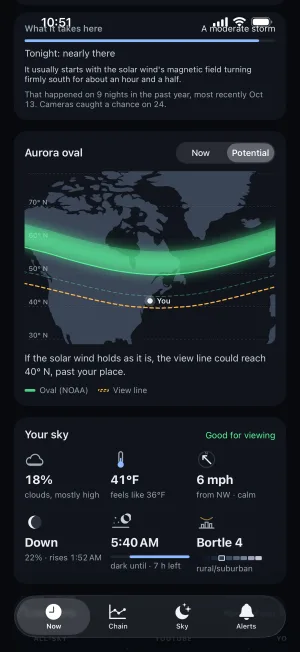
NOAA's live aurora oval on a map around you, with the view line: how far south the aurora may be seen low on the horizon. The Potential tab shows where that line could reach if the current solar wind holds.

Map of the aurora oval over Canada with a view line reaching past Rhode Island

Tuned to where you stand

What it takes, right here

Southward knows what your latitude needs, in plain words: a moderate storm, say. It shows how many nights reached that level in the past year, and how close tonight is.

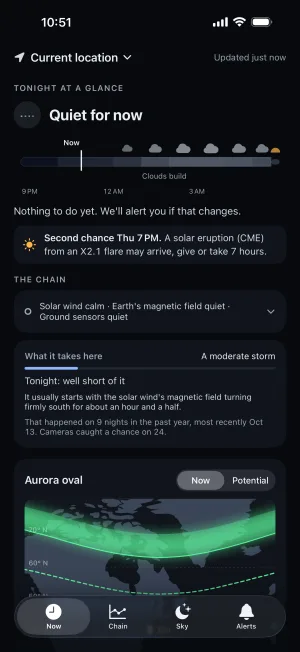
Calm on quiet nights: cards with nothing to say fold away, and the chain folds to one line.

Now screen on a quiet night with the chain folded to one line

Your sky

Your sky, and eyes on the horizon

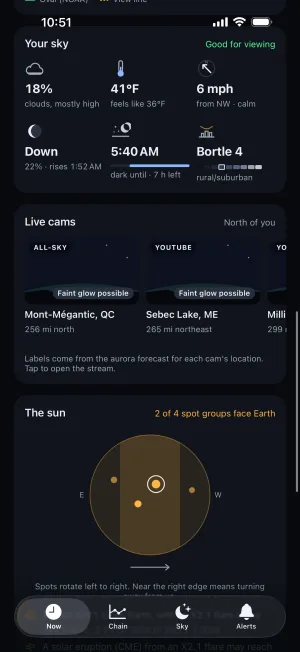
Clouds by the hour with their layers, temperature, wind, the moon, dark hours, and an estimated Bortle class for the light pollution at each place.

Then 46 live aurora cams worldwide, nearest first, each labelled by what the aurora forecast says it's likely seeing. Tap one to open the operator's own stream.

Sky conditions and a row of nearby aurora webcams

The sun

From the sun to your camera

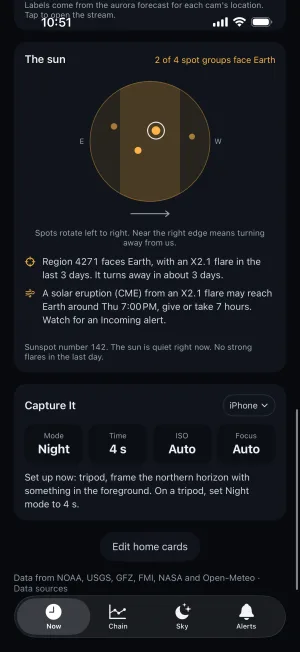
The sun's disk with its sunspot groups, which ones face Earth and when they turn away, recent flares and the daily sunspot number. A flare doesn't change tonight's sky, and Southward says so. When a solar eruption may reach Earth, it tells you roughly when, give or take a few hours.

Capture It then suggests camera settings for your gear and tonight's conditions, with a tip on what to do.

Sun disk with sunspot groups and camera settings for tonight

Lock screen

Live Activity and widgets

Follow the chain without opening the app. The Live Activity shows the stage, how long Bz has been south, Hp30, and the arrival time while it's incoming, on the Lock Screen and in the Dynamic Island. Widgets keep the state on your Home Screen.

Live Activities are part of Pro. Widgets are free.

Privacy

No account. Your location stays yours.

Read the privacy policy
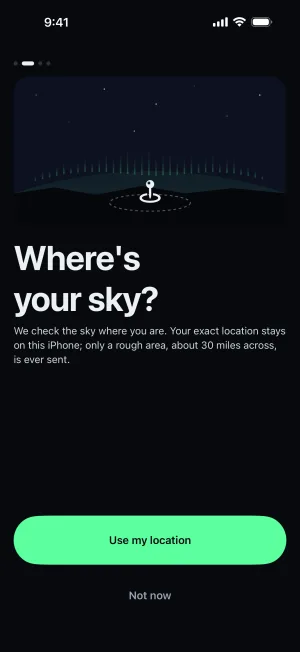
  • No sign-up. Southward works the moment you open it. There's no email or password to hand over.
  • Your exact location never reaches our server. It only knows a rough area, about 30 miles (50 km) across, so it can send the right alerts.
  • Your places sync through your own iCloud, not through us.
Onboarding step explaining only a rough area is shared

Pricing

Free for one place. Pro for the nights that count.

Everything you need to start chasing is free. Pro adds the alerts and tools serious chasers want.

Free

$0

For one place: your current location.

  • Auto alerts: Aurora possible, Incoming and Delayed
  • Heads-ups for big flares and solar eruptions
  • Sensitivity tuned to your location
  • Every home card, plus the Chain and Sky tabs
  • Home and Lock Screen widgets
  • 7 days of alert history
Coming soon to the App Store

Pro

$3.99/ month

or $24.99 a year

  • Go now alerts, the moment it kicks off
  • Many saved places, with your own names and icons
  • Custom alert thresholds
  • Live Activities on the Lock Screen and Dynamic Island
  • Expert numbers on Status, The chain, Aurora oval and The sun
  • Full alert history

Subscribe in the app. Cancel anytime in your Apple Account settings.

FAQ

Questions

Isn't Kp enough?

Kp is a three-hour index, so by the time it climbs, the best part of the show may be over. Southward follows what leads up to it: the solar wind 30 to 60 minutes upstream of Earth (Bz turning south and staying there), Earth's magnetic field loading up, ground magnetometers catching the onset, and your own clouds and darkness.

Does it work where I live?

Alerts are tuned to your location's magnetic latitude, so "worth going out" means something different in Fairbanks than in Rhode Island. Southward is most useful within reach of the aurora: the northern US, Canada, the UK and Ireland, northern Europe, Tasmania and New Zealand.

Does it work in the Southern Hemisphere?

Yes. It uses the southern oval, the alerts tell you to look south, and the cams include Tasmania and Antarctic stations.

What does "What it takes here" mean?

The level of activity your location usually needs for aurora to be visible, and how often that happened in the past year. It's based on your magnetic latitude and a year of geomagnetic data, not a promise.

What's the view line?

How far from the aurora oval the aurora may be seen low on the horizon. If you're poleward of it, it's worth looking.

Can it promise I'll see the aurora?

Nobody can promise that. Southward tells you when the chances are good and what to do about it. Clouds, light pollution and how far north you can see all matter, and the app shows each one for your place.

What does Pro add?

Go now alerts the moment activity kicks off, many saved places with your own names and icons, custom alert thresholds, Live Activities, the expert numbers on Status, The chain, Aurora oval and The sun, and your full alert history. Everything else is free.

Do you track my location?

No. Your saved places stay on your iPhone and in your own iCloud. The server only knows a rough area, about 30 miles (50 km) across, so it can send the right alerts and weather. There's no account. See the privacy policy.

Where does the data come from?

NOAA's Space Weather Prediction Center for the solar wind, GOES satellites and the aurora oval; NOAA NCEI for the solar-wind archive behind "What it takes here"; USGS and FMI ground magnetometers; GFZ's Kp and Hp30 indices; NASA DONKI for CME arrival estimates; and NASA Black Marble for light pollution. Weather comes from a weather service that sees only those rough areas.

Does it need Apple Intelligence?

No. On iPhones with Apple Intelligence, the Tonight summary is worded by the on-device model from facts the app has already worked out. Everywhere else you get the same facts in a plain sentence. Alerts never use AI.

Which iPhone do I need?

Any iPhone that runs iOS 26. Southward is iPhone only: it isn't on iPad, Android or the web.